Sunday, 3 July 2016

Track / clip View - basic controls

To duplicate a track:
1. Shift + press down ◄► knob

To shorten or lengthen a track 
1. Shift + turn ◄► knob
    Don't press the knob down.

Change clip colour
 Shift + turn ▼▲ knob
 
Horizontal clip shift (nudge)
Push & hold ▼▲ knob + turn ◄► knob
(to nudge microsteps {24 micro steps per note} - Press note +Press & Turn ◄► knob)

Ratchet notes (note repeat)
Press note  & Press + turn ▼▲ knob

To move a note up or down.
 Hold down the note (grid pad) & turn ▼▲ knob

Note velocity
Hold the note (Grid pad) + turn ◄► knob


While a clip is playing, if you want to go up or down an octave
 Hold down & turn the ▼▲ knob


While a clip is playing, if you want to shift the notes up or down
1. Press play
2. Press shift
3. Press & turn the  ▼▲ knob

To clear a pattern.
Hold ◄► knob & press "Back"

-----------------------------------------------------------------------------

AUTOMATION


Parameter Automation 
1. Turn record LED on.
2. Press Play.
3.  turn Parameter knob
4. Turn off record when finished.

Per note parameter change
Note start Grid pad + turn Parameter knob

To undo or Delete the parameter automation
1. press & hold Shift

2. press the relevant gold Parameter knob 

Copy automation
Hold Learn + push Parameter knob

Paste automation
Hold Learn + Shift + push Parameter knob

Parameter locks (per note)
Hold note + turn gold knob

You can also change parameters over a whole track that is not locked to a particular note.
1. Make a muted row of notes (in your existing track).
2. add the parameter changes to the muted notes. 


-----------------------------------------------------------------------
 To Load a sample
1. Press the Audition pad +  press load

 to Enter the Sound Editor
1. Press Shift.
2. Press (shortcut labeled) Grid pad or push Select knob

--------------------------------------------------------------

 To create a new Synth or New kit
1. Press Shift
2. Press Synth or Kit

 -----------------------------------------------------

To change scales
1. Shift
2. Scale 
---------------------------------------- 

Copy & Pasting


Copy notes
{To Copy the whole clip screen (what is in view)}
1. Press & Hold Learn

2. push ◄► knob

Paste notes
1. Press & Hold Learn

2. Press & hold Shift.
3. push the ◄► knob


 -------------------------------------------------------------

Zooming in & out
1. to Zoom in 
    Press down black ◄► knob + turn ◄► knob to right

2. to Zoom out 
    press down black ◄► knob + turn ◄► knob to left

---------------------------------------------

To change length of a track/clip
Hold down shift + turn ◄► knob to right
   (don't push the knob down)

---------------------------------


Probability, Percentage & Iteration

To Set Probability & the % a note plays
Hold the note (Grid pad) + turn gold Select knob left


Set several notes to play only when first plays
Hold all Grid pads at same time + turn Select knob left


Set iteration dependence for a note
Hold the note (Grid pad) + turn black Select knob right

You will see 1 oF 2, 2 oF 2 , 1 oF 6, etc etc
(one of 2 passes, etc etc) 

------------------------------------------------------------------------ 

to use an external MIDI keyboard
1. Hold down learn.
2. Press any audition key/pad
3. Press any key on your midi keyboard.
(the audition buttons will turn white)


To undo this :
1. Press learn
2. Press any audition key/pad
----------------------------------------------
Preset load interface
Press Load + synth/kit


Begin playback from current screen
Push ◄► knob + Play


Audio clip trim
Press rightmost column at end of waveform

Sunday, 26 June 2016

New Sound Waves - Synth Meet - Sunday 26 June

107 Redfern St, Redfern.

Another fun arvo with my friends from New Sound Waves.


....video 1


video 2


Korg 911 Guitar synthesizer


video 3
 These Metro Modular modules look great. They are on my to buy list.
Justin, their designer was at the meeting. Very helpful in explaining them. The filters esp sound great. Based on old Aires schematics, with oodles of modulation points.

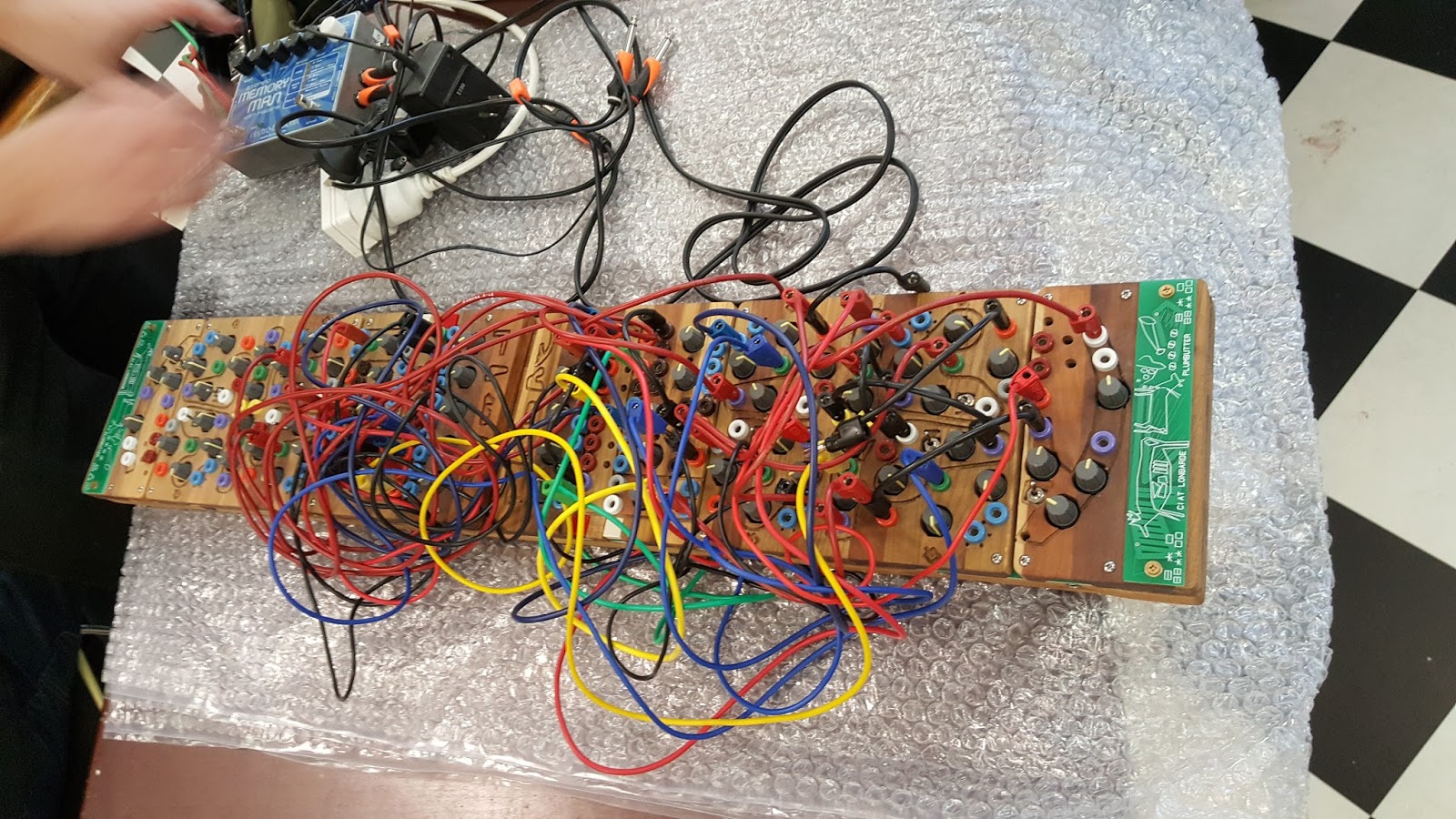
 And, like wow... Paul A shows up with not one, but two Plumbutters. OMG.

Built by Ciat- Lonbarde its true what the blurb says ... its a drum & drama machine.

"My face is a psycho-geographical map of the cities of Baltimore and Cleveland.....
You can see my wild spaces are represented by a deer-horn,...


 and my downtown by a factory, and in between, a vast swath of suburban developments. 


It is a gradient of these three areas- urban, suburban, and rural- that informs my electronic synthesis. "

I'll upload videos soon.
J

Saturday, 25 June 2016

Buchla format 212r - Dodecamodule

Some pics of a recent build. The 212r is a awesome sounding module.
(video to go up here soon). I would love to hear a vintage one.

These aren't building instructions, just some records for future reference should I decide to
build another..

It was quite a big build .... lost count of time after the first 20 hrs., but I reckon you could knock
one off in a weekend if you put your mind to it. (I'm not a professional technician).

This is PCB 1

PCB 2 ... reverb tank sits in the middle.
Its very much like the setup in a 208r version 1.


One cap exploded while I was testing various +15v to +24V voltage regulators.
I decided to just use my system's external +24v bus.

reverb tank fitted :-)

I've mixed the knobs up on purpose to remind me of the pot values. Davies are all 10k linear.
Serge style are 50k log.


I'm very impressed with the module. I esp like the output amplifier on the right.

I finally understand why there are a mix of 50k & 10k pots. Its a beautiful sound. We have voltage control over amplitude on the top, voltage control of location (left/right channels) in the middle, and CV of the reverb on the bottom.

More videos to be posted soon here.
...

Up till now I have been using a pulse from the buchla 281 to trigger the 212r. However a question in muffs from Robbot emcouraged me to test the dodecamodule again. It actually does not need an external clock (like the vintage 212). "The envelopes will self cycle using this trick - patch a cable from the red pulse output of the Triple Env Generator section of the 212 back to the red pulse input and then set the attack / decay time to the desired speed.

If that doesn't automatically start the env generator clocking, flipping the 'sustain' switch up/down and back will do". Thanks Robbot. :-)

Tuesday, 21 June 2016

Favourite Scales - minor

A standard (chromatic) scale consist of twelve notes: C-C#-D-D#-E-F-F#-G-G#-A-A#-B. 
Every scale is a selection from these twelve notes.
 
The most widely used scale in western music is the C major or C Ionian scale: 
These are the white keys on a piano ascending from C to C' 

C major has a specific series of intervals:
tone, tone, semitone, tone, tone, tone, semitone.
T-T-ST-T-T-T-ST
 This is known as the Ionian mode.
 
-------------------------------------
 
Many EDM songs are written in a Minor Scale
There are 3 types of minor scale- natural, harmonic & melodic (more of this later)

The step pattern of a natural minor scale is:
 (Start with your root note)
tone, semitone, tone, tone, semitone, tone, tone. 
T-ST-T-T-ST-T-T
Use the formula starting on any note to play the minor scale in a different key.

The most common keys are A Minor and C Minor – those are hugely popular.

This is a personal list... it may not appeal to everyone 

1 – CHROMATIC, 2 – IONIAN, 3 – DORIAN,

4 – MAJOR PENTA, 5 – MINOR PENTA,

6 – SHARP NOTES, 7 – WHOLE TONE,

8 – MIXOLYDIAN, 9 – MAJOR BLUES,

10 – MINOR BLUES

 ------------------------------------------------------------------------------


A Minor Scale (natural)


-------------------------------------------------------------

A Minor Pentatonic

Just 5 notes


---------------------------------------------------------------------

C (natural) Minor.

consists of the pitches C, D, E♭, F, G, A♭, and B♭
Whole step/half/ whole/whole/half/whole/whole.
(WHWWHWW) or (T-ST-T-T-ST-T-T)


The C minor pentatonic is C, E-flat, F, G, B-flat.
 

The C minor Harmonic scale is C, D, Eb, F, G, Ab, B, C 
(To convert any natural minor scale into harmonic minor raise the 7th note by half a step.)


--------------------------------

D minor

D minor is a minor scale based on D, consisting of the pitches D, E, F, G, A, B♭, and C
 
tone, semitone, tone, tone, semitone, tone, tone. 
T-ST-T-T-ST-T-T 
 

The notes of the D minor pentatonic scale are as follows: D – F – G – A – C.
 
 
--------------------------------------------------------------- 

F (natural) minor

 
F G Ab Bb C Db Eb F
 
tone, semitone, tone, tone, semitone, tone, tone. 
T-ST-T-T-ST-T-T 


F (harmonic) minor


To convert any natural minor scale into harmonic minor raise the 7th note by half a step.

 
F - G - Ab - Bb - C -Db - E - F
 ---------------
------------------------------
 
Below is a brief summary of natural vs harmonic vs melodic
 
Natural Minor
 Start with your root note.
Whole step/half/ whole/whole/half/whole/whole.
eg : 
the A Natural Minor scale is: A, B, C, D, E, F, G, A
The G# natural minor scale is : G#,A#,B,C#,D#,E#,F#,G# 
The C natural Minor scale is : C,D,Eb,F,G,Ab,Bb 


------------------

Harmonic Minor
 Really good for building chords
To convert any natural minor scale into harmonic minor raise the 7th note by half a step.

eg

The C harmonic Minor scale is : C,D,Eb,F,G,Ab,B


 --------------------------------------------

Melodic Minor
This is all about melodies .
To convert a natural minor scale into a Melodic minor
raise both the 6th & 7th notes by half a step


The C melodic Minor scale is : C,D,Eb,F,G,A,B


-----------
 phrygian dominant scale.
This is the fifth mode of the harmonic minor scale, the fifth being the dominant.
This scale occurs in Indian, Middle Eastern, Eastern European, Central Asian, and Flamenco music. It is common in Arabic and Egyptian music,
 

The sequence of steps forming the Phrygian dominant scale is:

  • half – augmented second – half – whole – half – whole – whole
 The C phrygian dominant scale is : C – D – E – F – G – A – B – C


 %%%%%%%%%%%%%%%%%%%%%%%%%%%%%%%%%%%%%%
 
Though most of this post covers minor scales. Here are others which I sometimes use
 -------------------------------------------------
Chromatic
 ----------------------------------------------------------
 Major
 ------------------------------------------------------------------------
Blues
 
-------------------------------------------------------------
Myxolydian mode

The mixolydian mode is the 5th mode of the major scale
 
C: C, D, E, F, G, A, Bb, C 
D: D, E, F#, G, A, B, C, D
E: E, F#, G#, A, B, C#, D, E
F: F, G, A, Bb, C, D, Eb, F


The Mixolydian scales are believed to have been discovered by the Ancient Greek female poet Sappho
---------------------------------------------------------------
Dorian mode .
(Often called the second mode of which there are 7 ....Ionian, Dorian, Phrygian, Lydian, Mixolydian, Aeolian and Locrian.)
This is very similar to the natural minor scale. The only difference is in the sixth note, which is a major sixth above the first note, rather than a minor sixth.
 
Formula: Whole, Half, Whole, Whole, Whole, Half, Whole

C Dorian: C, D, Eb, F, G, A, Bb, C
D: D, E, F, G, A, B, C, D
E: E, F#, G, A, B, C#, D, E
F: F, G, Ab, Bb, C, D, Eb, F
 
 Examples are :
'Billie Jean' by Michael Jackson,
 'Smoke on the Water' by Deep Purple
 Scarborough Fair.
--------------------------------------------------------------------------------------------------
Octatonic
An octatonic scale is any eight-note musical scale
composed of alternating whole and half steps.
 
This is a C-octatonic

Notes: C, Db, Eb, E, Gb, G, A, Bb, C 
 
------------------------------------------------------------------------------------
Diminished
This is a symmetrical scale that is built by alternating whole steps and half steps. 
 Diminished chords are formed by combining the root, flatted third (minor third) and flatted fifth of the major scale (1, ♭3, ♭5).
 
the notes of the C major scale are C, D, E, F, G, A, B. 
To form C diminished, you combine the notes, C, E♭ and G♭.
 

---------------------------------------------------------

Triad on a M7 chord

Not striclty a scale .. but might be useful

-------------------------------------------------

A sharp Phygian - Favourite of Apex Twin
All sharps except B


--------------------------------------
Aeolian pentatonic scale, also known as Hirajoshi scale.
ie 5 tones


tonic (1), second (2) minor third (b3), fifth (5) and minor sixth (b6).
(This is a fav of my mate Mitch)

C, D, D#  ---- G, G# 

I like this variation:
C, D, D#  ---- F, G, G# - A#

Sunday, 19 June 2016

ATMEGA16 microcontroller AVR Synth - Elby Designs


  • just tweaking this new synth
  • trying to find its sweet spots
  •  
  •  
  • "The AVRSYN is a monophonic "virtual analog" synth based
    • on the Atmel AT90S8535 microcontroller. It was originally designed by Jarek Ziembicki.
    • His aim was to check to see if a simple micro-processing chip could be used for sound synthesis.
  • Paul Maddox later adapted this design design using a
  • ATMEGA16 instead as the AT90S8535 is no longer in production.
    • The AVR consists of
    • two DCO's, a DCF, and a DCA. There is also an LFO and an AR/ASR
  • envelope generator.
  • This synth comes in a kit form
  •  
  •  The AVRSYN is a monophonic "virtual analog" synth based on the Atmel AT90S8535 microcontroller. It was originally designed by Jarek Ziembicki. 
  •  
  •  
  • His aim was to check to see if a simple micro-processing chip could be used for sound synthesis. Paul Maddox later adapted this design design using a ATMEGA16 instead as the AT90S8535 is no longer in production. I think they succeeded. The AVR consists of two DCO's, a DCF, and a DCA. There is also an LFO and an AR/ASR envelope generator. All sounds are from the AVR. Thanks to Blake C for the tweaking. Check out Blakes tunes at: http://soundcloud.com/blakusmaximus 
  •  
  • Thanks to Matt from RhythmActive for the AVRSYNTH http://www.rhythmactive.com.au/

Thursday, 16 June 2016

Arturia - Beatstep Pro - basic manual

Projects

BeatStep Pro allows you to store and recall 16 Projects. Each Project contains a MIDI controller map, and a bank of 16 sequences for each of the three sequencers (Seq1, Seq2, Drum).

To recall a Project:
hold the PROJECT button and press one of the 16 step buttons. The currently loaded Project will be displayed by a lit button.

When you open a new project, the default settings are:
SEQ1, SEQ2 and DRUM send and receive on channels 1, 2, and 10
Time division is set to 1/16 •
Gate time for each step is 50% •
Swing is set to 50% •
Randomness and Probability are set to 0.

As soon as you make any changes, you will have started a new project.

1. select a pattern.
 Use the <> buttons or press the SEQUENCER button + the number.

2. Clear a pattern
  hold the SHIFT button and press Step button 1.

3. Set Tempo
  Turn the RATE/FINE encoder.  or use the TAP button

4. Record a pattern
  Select SEQ1, press the RECORD button and press the PLAY button.
 Use the pads as a keyboard to enter notes in real time.

5. To Save a pattern
    a. press SAVE
    b. Press the step button - number 1 to 16

6.    To save a project:

a. Hold the SAVE button
b. Press the PROJECT button and hold it •
c. Press the Step button number you chose earlier. (number 1 to 16)

When you follow these instructions you will overwrite the selected Project and all of its patterns.
Be sure this is what you want to do! If not, be sure to find out which memory location is available and store the Project there instead.


-------------------------------------

Sequence Length

The default length is 16 steps, but a sequence can be up to 64 steps long.

If you’d like your sequence to be less than 16 steps long, simply hold the LST STEP button and then press the Step button that corresponds to the desired setting.

To make longer sequences:

(Chapter 4.3.5.1 of manual)

1.  press the << and >> buttons at the same time . The buttons should be dark.

Hold the LST STEP button. •
Press the >> button once. A white LED will appear above the number 32.
Press Step button 16 (technically it’s button 32 now). It will turn green. •
Release the LST STEP button. Step 32 has now been defined as the last step in the sequence.

Now press << and >> at the same time to enter Sequence Follow mode (the buttons should be lit).

Next, press Play. You should see the Step buttons cycling through two sets of 16 steps, one with data and one without. You should also see the Step Group LEDs changing every 16 steps:

Steps 1-16: Red LED over #16, White LED over #32 •
 Steps 17-32: unlit LED over #16, Pink LED over #32 (White + Red)

The Red LED indicates the current position of the sequence. The White LED means that the last step in the sequence is during steps 17-32.

If you decide you want more than 32 steps for this sequence, hold the LST STEP button and press >> until the White LED is over the right number. Then press the appropriate Step button and you’re ready to create.


Tuesday, 14 June 2016

ARP 2500 - My Monday Fix

Playing around with the 1004T VCO


This is a unedited and live video. The two main modules used are the 1004T (toggle switch) VCO and a 1047 filter.


The 1004 oscillator is the most versatile in the series (1004T, 1004R, 1004p) R & P stand for Rocker & Pot.
The 1004T has inverted waveforms & a built in mixer.